
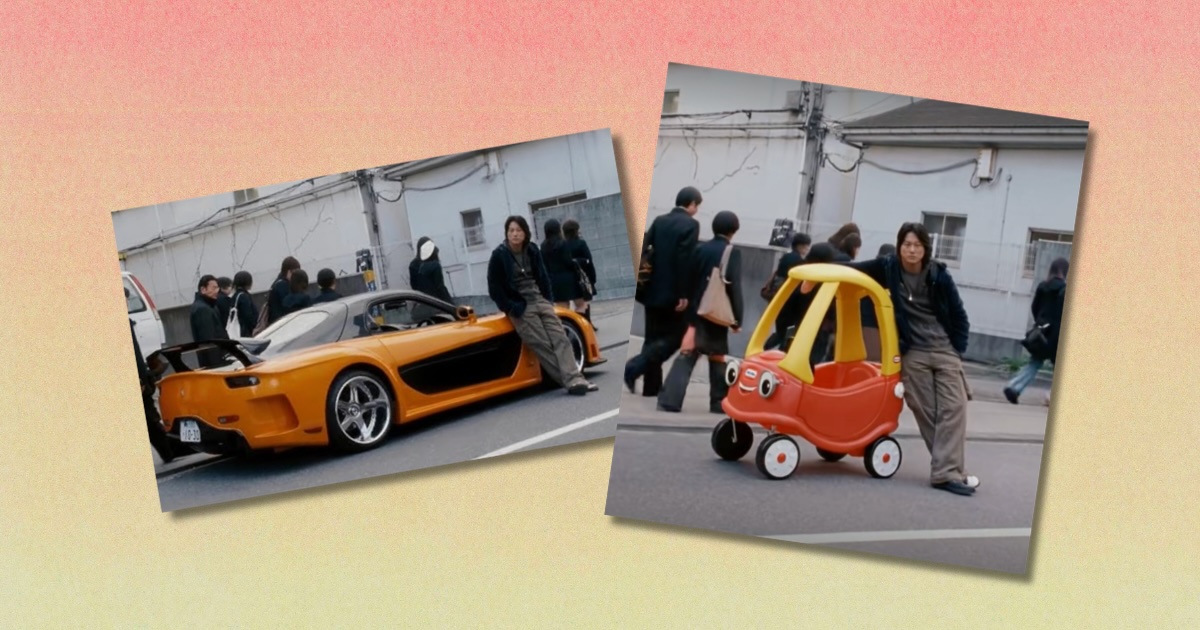
It’s everywhere right now
Everyone on social media is obsessed with that viral trend where you make an AI meme using a scene from The Fast and the Furious: Tokyo Drift, but how do you do it? Here’s a full explanation if you’re confused.
The trend has been taking over TikTok, Instagram and Twitter this month, and sees people replacing the car from the iconic scene where Han leans against his orange Mazda RX-7 with hilarious alternatives.
People are changing the sports car in the 2002 film to all kinds of brilliant things, from Mr Bean’s Mini Cooper to one of those red and yellow plastic cars that you had as a kid and a pirate ship.
Some are even changing Han to different people, too, like Donald Trump, Tiffany from White Chicks and SpongeBob. If you want to join in the trend and make your own AI Tokyo Drift meme, here’s how to do it.
@mx5modified
Cody coupe Han knows! #fastandfurious #tokyodrift #cosycoupe #han #ai
♬ original sound – ෆ
Here’s how to do the AI Fast and the Furious: Tokyo Drift meme trend
First, you need to download an app called Kling AI
Then create an account. You only get one free go, so don’t get it wrong!
Click “Explore” in the bottom bar
Type “Fast and furious Tokyo Drift” in the search bar
Find the template and click “Recreate”
Delete the second photo and add your car
Change the prompt to the colour of your car
If you want to create a picture version of the trend, find a screenshot of Han leaning up against the car online and upload it to ChatGPT or Google’s Gemini. Then, also upload the photo of the car you want in the image instead, and ask the chatbot to replace the car in the image. It’s really that simple!
For more like this, like The Tab on Facebook.
Featured image credit: TikTok and Universal Pictures
AloJapan.com